
CAT4OM can manage multiple radios, groups, clients, bridge profiles, and operating positions from one service, keeping radio state shared and command ownership clear.
One service, many radios, one coherent station
CAT4OM is designed to manage more than one radio from the start. A station can contain a single transceiver, multiple independent radios, a main rig with one or more receivers, or several operating positions without making every application open and manage every physical radio connection.
Each radio keeps its own configuration, connection, capabilities, and live state. Different manufacturers, models, and protocols can coexist behind the same CAT4OM service.
In a traditional setup, each application often needs its own radio configuration. A logger may be configured for one CAT port, a digital-mode program for another, a monitoring tool for another, and the operator may need to remember which application is allowed to transmit or change frequency.
CAT4OM centralizes that configuration. The radio is defined once, with its handbook, connection settings, group membership, bridge profiles, audio settings, startup behavior, and diagnostics. Applications then connect to CAT4OM rather than each trying to own the physical radio connection.
Radios and groups
Radios are organized into control groups. Each running group has its own control endpoint and its own connected clients, so the station can be arranged in a way that matches the real installation.
Groups provide a practical boundary for:
- radio lifecycle and connection management;
- control endpoints;
- client ownership;
- authentication settings;
- automatic startup and shutdown behavior;
- monitoring and troubleshooting.
A compact station may use a single group. A larger installation can separate HF, VHF/UHF, SDR receivers, testing benches, or different operating positions.
Multi-client control with ownership
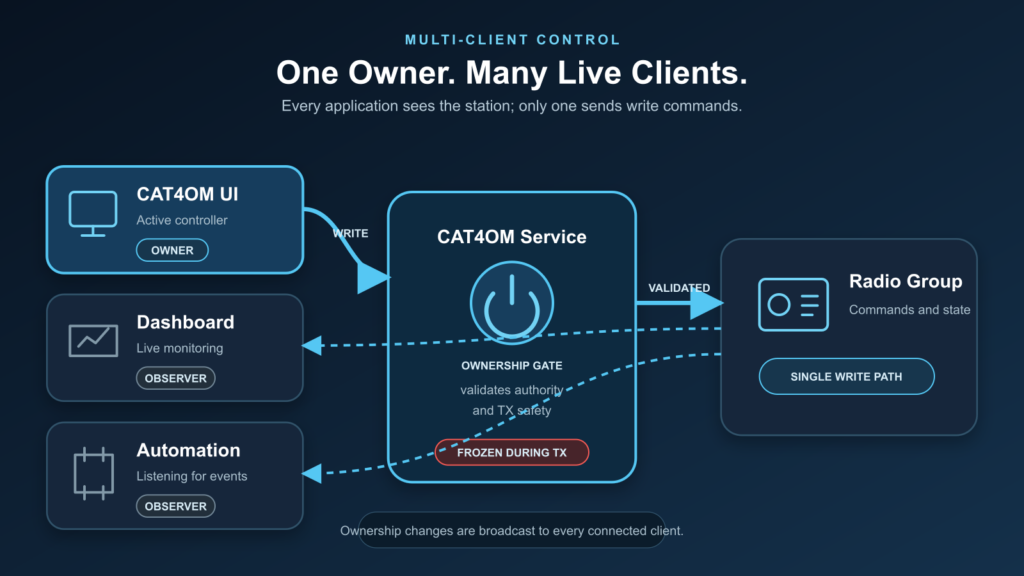
Several clients can connect to a group and receive the same live radio state. This makes it possible to run the CAT4OM UI alongside a logging program, digital-mode software, a monitoring display, or a custom integration.
Command ownership keeps write access clear. One controller owns the right to change the radio; the others continue to observe live state and can request ownership when needed.
This removes a common source of CAT instability: multiple programs trying to write independently to the same radio port without knowing about one another.
Mixed protocols in the same station
A single CAT4OM installation can contain radios that use different control technologies. One group may contain a serial CAT radio, another may use Icom CI-V, another may expose a TCI-compatible radio, and another may use FlexRadio SmartSDR.
The operator does not need to reduce the station to one manufacturer or one protocol family. CAT4OM’s role is to make those radios manageable through a consistent model while still respecting what each individual radio can actually do.
Portable and installed operating styles
CAT4OM supports both portable and installed operating styles. A lightweight or temporary setup can be kept simple, while a permanent station can use persistent radio IDs, saved group configuration, bridge profiles, audio settings, startup behavior, and diagnostics in a stable layout.
This makes the same application suitable for a laptop in the field, a home shack, a test bench, or a more permanent multi-radio installation.
Start, stop, reconnect, and monitor
Multi-radio stations need clear lifecycle control. CAT4OM can start and stop groups, start and stop individual radios, report live connection status, and automatically reconnect where appropriate.
This helps during both normal operation and troubleshooting. An operator can bring up one part of the station, test a single radio, restart a bridge profile, or stop an unused group without treating the whole station as one fragile connection.
Typical station layouts
CAT4OM fits several operating styles:
- one radio shared by CAT4OM UI, Log4OM, and WSJT-X/JTDX;
- a main HF radio plus an SDR follower;
- independent groups for different bands or operating positions;
- a bench setup for radio profile validation and diagnostics;
- a station where control, monitoring, and automation are handled by separate clients.
Use CAT4OM groups to model your real station layout and give each radio a clear place in the control system.