
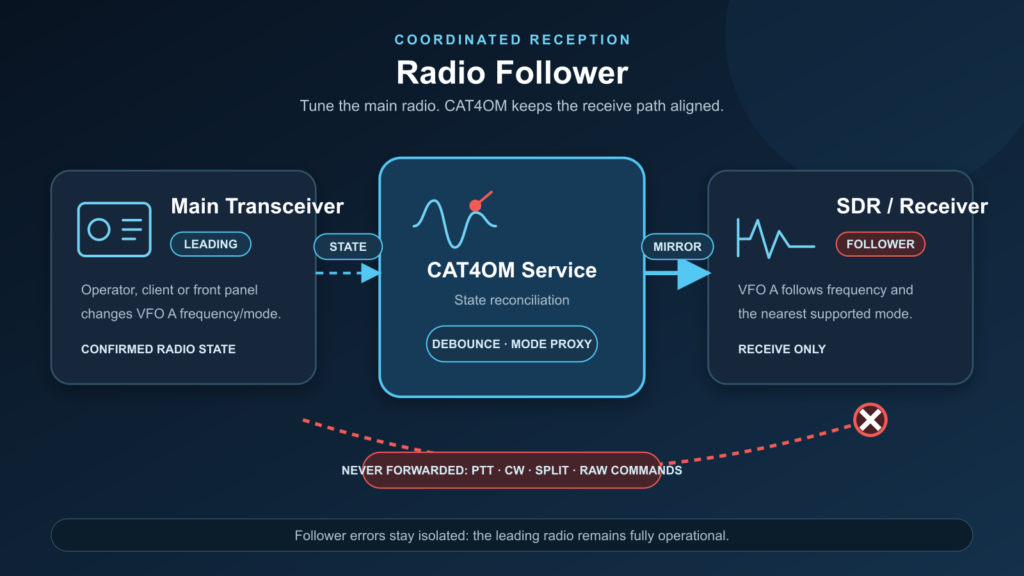
Radio Follower keeps a second radio, receiver, or SDR synchronized with a leading radio, including frequency, mode, displayed-frequency handling, and offset-aware station layouts.
Keep a second radio aligned with the main one
Radio Follower lets CAT4OM keep one radio synchronized with another. A leading radio provides the operating reference, while a follower radio tracks its frequency and mode.
This is useful when the operator wants a second receiver, SDR, monitoring radio, or transverter-related device to follow the main operating frequency without making every client application coordinate the pair.
Typical uses
Radio Follower can support station layouts such as:
- an HF transceiver with an SDR receiver following along;
- a main radio plus a receive-only companion radio;
- a transverter setup where displayed frequency and radio frequency differ;
- a monitoring receiver that tracks the active operating position;
- a comparison receiver used for testing or diagnostics.
Radio Follower is often useful for receive-only SDRs, but it is not limited to that. It can also support comparison receivers, test-bench radios, monitoring rigs, or station layouts where two devices need to remain frequency-aware while still having different command sets and capabilities.
Frequency and mode synchronization
CAT4OM can synchronize frequency and mode from the leading radio to the follower. The follower can be configured to follow either the radio frequency or the displayed frequency, which is especially useful when offsets or transverters are involved.
When exact mode matching is not available, CAT4OM can use compatible mode handling so the follower remains useful without forcing unsupported operations.
Follower configurations can also support optional two-way frequency following when the station layout calls for it, while keeping follower status and errors visible from CAT4OM.
Offset-aware operation
In many stations, the frequency shown to the operator is not always the same as the frequency sent to the physical radio. Transverters, IF chains, and SDR companion receivers often introduce an offset between the operating frequency and the radio’s actual tuned frequency.
CAT4OM’s offset-aware model gives Radio Follower a cleaner way to handle those situations. The leading radio can provide a displayed frequency that represents where the operator is working, while CAT4OM still understands the radio frequency used by the hardware.
This makes follower operation more practical for VHF, UHF, SHF, satellite-related receive chains, SDR panadapter layouts, and other stations where a simple “copy this VFO value” approach is not enough.
Follower status and diagnostics
Follower logic runs inside the CAT4OM service. External clients do not need to know how the pair is coordinated; they continue to see the station state through the normal CAT4OM model.
Follower status, configuration, and diagnostics are visible from CAT4OM, helping the operator understand whether the linked radios are synchronized and healthy.
A follower radio may be unavailable, temporarily disconnected, slower to respond, or unable to use the exact same mode as the leading radio. CAT4OM keeps follower behavior visible and diagnosable without letting the follower silently destabilize the leading radio’s normal control path.
Use Radio Follower when your station needs a second radio, receiver, or SDR to stay aligned with the main operating position.